
PLC Sequence Studio
Teach a machine sequence by demonstration - no ladder logic.
Ba bước để chạy được
- 1. Tải gói .orx — tải tự do, không cần mua trước. Giải nén rồi chạy
./runGui.sh: gói tự kiểm chữ ký, đọc mã thiết bị của bạn và ghi raactivation-request.json. - 2. Mua giấy phép — giấy phép gắn với đúng thiết bị trong file yêu cầu ở bước 1.
- 3. Kích hoạt — tải
activation.jsonvề, đặt cạnh gói, chạy lại là xong. Sau đó chạy offline vĩnh viễn, không cần mạng.
Tải gói mà chưa mua thì chạy được đến bước xin kích hoạt rồi dừng — dùng để xem trước gói thật và kiểm tra máy có đọc được thiết bị không, trước khi trả tiền.
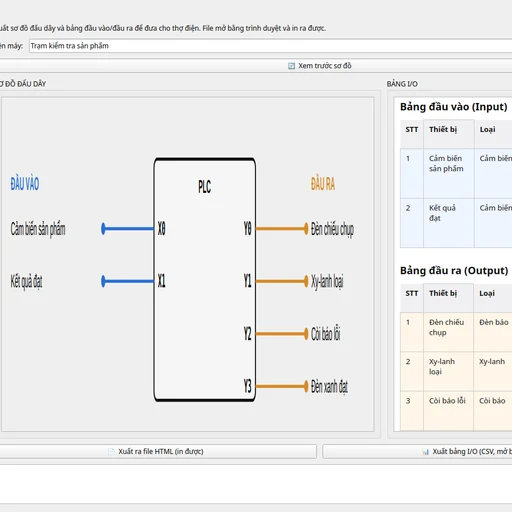
Drag real devices (sensors, cylinders, lamps) onto a screen mock-up of the machine, set each one to the state a step needs, and choose what to wait for. The sequence runs step by step on the computer and drives the PLC over bit reads/writes, like an external soft PLC. Comes with 22 ready-made sample machines and exports a wiring diagram plus I/O table for the electrician.
Requires
· PLC (Mitsubishi FX, Modbus TCP/RTU device, or Siemens S7)
Optional
· Additional I/O for larger machines
Features
· Steps as "do this, then wait for that" - the way a machinist already describes a cycle
· Branching on a sensor state for pass/fail sorting and error handling
· Checks the sequence for missing devices or bad jumps before it ever runs
· 22 sample machines, each with devices and a full sequence, ready to run and edit
· Exports a wiring diagram (SVG/HTML) and CSV I/O table for the electrician
· Own Mitsubishi FX driver plus Modbus TCP/RTU, MC Protocol, and S7comm